How to add to Advanced Side Box
By default the plugin adds `<!--OUGC_FEAMEM-->` only to the `portal` template. However, it is possible to paste this code in almost any template to output the featured member container.
To add the container follow the next steps:
Now you should be able to display the feature box in your portal using the ASB plugin.
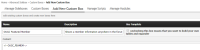
To add the container follow the next steps:
- Go to `Home » Advanced Sidebox » Custom Boxes » Add New Custom Box` to add a custom ASB box.
- Name: `OUGC Featured Member`
- Description: `Shows a member information anywhere in the forum.`
- Use Template: unchecked
- Contet: `<!--OUGC_FEAMEM-->`
Now you should be able to display the feature box in your portal using the ASB plugin.